Getting started
How to Create Your Creative Profile on Naebula
Your Naebula profile is your public portfolio and collaboration identity. It helps people understand who you are, what you create, where you work, and whether you might fit a shoot, casting call, studio project, or creative team.
What your Naebula profile is for
A good profile does more than list your name. It gives other creatives enough context to decide if they should save you, message you, invite you to a project, or consider you for a casting call.
That means your profile should make five things easy to understand: your role, your location, your visual work, your collaboration preferences, and the kind of creative trust someone can expect when they start a conversation with you.
Choose the right creative role
Your role shapes how people find you in Naebula directories and how they understand your place in a production. Choose the role that best describes the work you want to be discovered for when you create your profile.
Naebula profiles do not switch role after creation. If you work in more than one role, Pro lets you create a secondary profile instead.
Set your collaboration preference
Your collaboration preference helps people understand whether paid work, TFP or TFCD-style collaborations, or both are a good fit before they contact you. This is useful for models, photographers, make-up artists, stylists, hairdressers, videographers, producers, retouchers, and other creatives.
Clear preferences reduce mismatched expectations. They also help people decide whether to save your profile, invite you into a project, or start a more specific conversation.
You can set your collaboration preference from your public profile settings.
Set your location and discoverability
Your location decides where your profile is shown to other users in discovery. Set the city or area where you want people to find you for normal collaboration searches.
Discoverability controls whether your profile appears in those public discovery surfaces.
You can update your base location and public discoverability from your public profile settings.
If you want to be shown in another place temporarily, create a tour for the dates and location where you will be available.
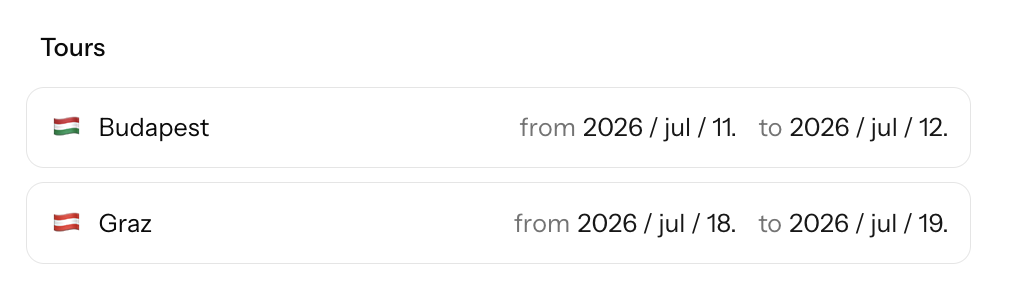
You can create and manage tours from your bio page when you want to appear somewhere temporarily.
Add a clear profile photo and featured image
Your profile photo helps recognition and trust. Use an image that makes it easy for people to understand who they are talking to before they message you or consider you for a project.
Your featured image is the first visual signal on your profile. Choose a clear, high-quality image that represents the kind of work you want people to remember you for. This is different from an about image, which can support the bio section on non-model profiles.
You can change your featured image from your bio page.
Write your catchphrase and bio
A catchphrase is short positioning: a quick line that gives your profile a point of view. It can describe your style, your role, or the kind of projects you are drawn to.
Your bio can be more practical. Mention what you create, what styles or projects interest you, where you usually work, and what kind of collaborations fit you.
You can edit your catchphrase and bio directly from your bio page.
Add portfolio media
For most visual creatives, portfolio images are the strongest proof of fit. Add work that shows your taste, range, and the kind of projects you want to attract. Quality matters more than filling every possible space. Gallery capacity depends on your account, with Pro profiles giving more room for larger portfolios.
Videographers can add portfolio video links from YouTube or Vimeo. Non-model profiles can also use an about image where it helps the profile feel more complete and specific.
You can manage gallery images, video links, and about image from your bio page.
Extra details for model profiles
Model profiles can include details that help photographers and casting organizers understand fit before starting a long message thread. That includes gender, height, bust/waist/hips, dress size, shoe, skin tone, and eye color.
Models can also add polaroids or digitals in a separate section. Keep these clear, recent, and simple. They should help someone understand your current look without heavy styling or editing.
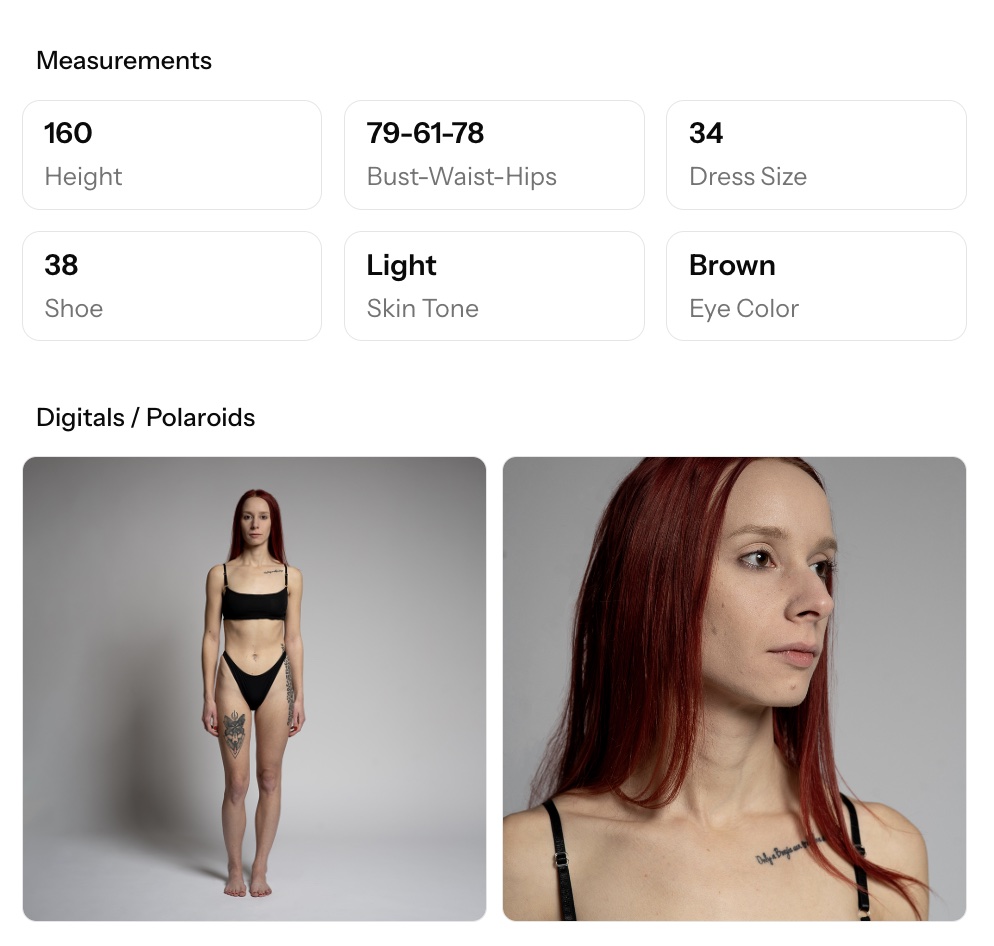
Model details and polaroids are edited from the model sections on your bio page.
Make your profile easier to trust
Trust starts with clarity. People do not need every detail of your creative life, but they do need enough signals to understand whether the profile is active, intentional, and relevant to the collaboration they have in mind. Those same signals also shape how useful your profile feels when someone finds you through Find creatives.
What to improve later
Your first version does not need to be perfect. A profile should grow with your work. Revisit it after shoots, after stronger portfolio updates, or when your availability and collaboration goals change. If you are preparing to respond to public opportunities, the projects and wishes guide explains how profiles support applications, direct messages, and collaboration planning.
- Replace older portfolio images as your work becomes stronger.
- Add pricing cards if they are relevant to your work and available on your account.
- Make your bio more specific as you learn what kinds of projects you want.
- Keep location, availability, and collaboration preferences current.
Use your bio page when you want to refresh media, bio details, pricing, tours, or model-specific profile content.
Start your profile
Create a profile, browse other creatives, or look at open collaborations to see how strong profiles help projects come together.
FAQ
Do I need a complete portfolio to create a Naebula profile?
No. You can start with the strongest work you have and improve the profile over time. A clear role, location, profile photo, featured image, and short bio are enough to make a useful first version.
What should I use as my featured image?
Use an image that quickly communicates the kind of creative work you want to be known for. It should be clear, relevant, and representative of your style.
Can models add digitals or polaroids?
Yes. Model profiles can include a separate polaroids or digitals section. These images should be simple, recent, and easy for photographers or casting organizers to understand.
Can videographers add videos?
Yes. Videographer profiles can add portfolio video links from YouTube or Vimeo, with optional titles to give each video context.
How does location help discovery?
Location helps other creatives find people near a shoot, studio, or project. It also gives collaborators a better sense of whether a conversation is practical.
Can I hide my profile from discovery?
Yes. Discoverability controls whether your profile appears in public discovery surfaces. You can adjust it from your profile settings.
Should I mention TFP or paid work on my profile?
Yes, especially if you are a model or regularly collaborate on photoshoots. Clear preferences help people understand whether professional, TFP, or flexible arrangements are a good fit.